Getting Started with
aira Beta 1.7
Set up your environment, run the simulation, and submit your first result to the leaderboard — no prior AI experience needed.
Requirements
Tested Environments
| Device | CPU | GPU | RAM | Status |
|---|---|---|---|---|
| Dev PC | Intel Core i5-12450H | RTX 3060 Laptop | 16 GB | Smooth |
| Surface Laptop 2 | Intel Core i5 (8th Gen) | Intel UHD 620 | 8 GB | Works |
Mac / Linux support coming soon.
Fork & Clone the Repository
Fork the repo to your GitHub account, then clone it to your PC in one click using GitHub Desktop — no terminal needed.
① Click the Fork button in the top-right corner of the repository page.
Open virtual-robot-race on GitHub →② After forking, click Code → Open with GitHub Desktop. GitHub Desktop will ask where to save the folder — choose somewhere easy to find.
git clone https://github.com/YOUR_NAME/virtual-robot-race.git
cd virtual-robot-race
Set Up Your Environment
Run the setup script to install all Python dependencies automatically.
On Windows, open the cloned folder in Explorer and double-click setup_env.bat.
setup_env.bat
Or manually with pip:
pip install -r requirements.txt
If setup_env.bat fails with an error, Python may not be installed (or you are on an unsupported version). Install 3.12 or 3.13 from the official site:
Download Python 3.12 / 3.13 →Set Your Race Name
Launch the simulator from VSCode — a setup window opens where you can enter your race name.
Open the cloned folder in VSCode, then run start.bat from the integrated terminal:
start.bat
The aira launcher opens. Enter your name in the Name field, then click START.
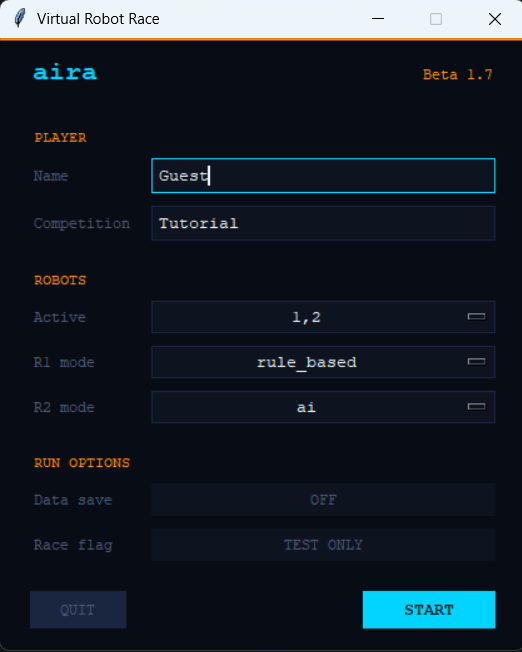
Once your name is set, click START — Unity launches automatically and the race begins.
Challenge the Leaderboard
Hit Submit in the GUI — your time is posted instantly. See how you stack up.
Tutorial Leaderboard — see who's already racing